General
- General
- Solutions
- Products
- Cases
- Technology
- News
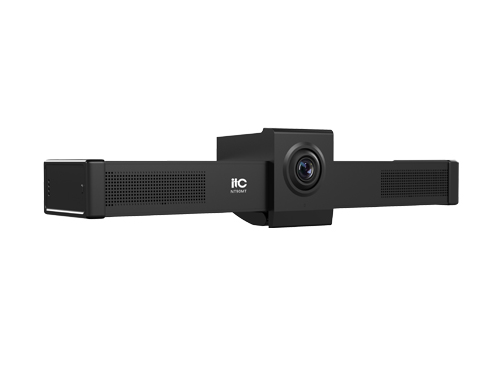
This brand-new all-in-one HD video conference terminal features a compact, integrated design with a built-in 4K camera, microphone, and multiple interfaces. It is small in size, offers a wealth of interfaces, facilitates easy wiring, and is simple to install and maintain.
* The all-in-one integrated design incorporates a built-in hardware video processing unit and an integrated HD camera, employing an embedded hardware solution for high efficiency and low latency.
* Adopts a complete native Android operating system, which can be seamlessly ported to Android video conferencing applications.
* It has 2 built-in array microphones that can pick up sound in all directions. Its unique noise suppression algorithm ensures that your voice is perfectly presented, and the effective pickup distance can reach 6 meters.
* Supports ITU-T H.323 and IETF SIP standard protocols, with good compatibility; supports H.239 and BFCP dual-stream protocols.
* Supports H.264, H.264 HP, and H.265 video codec protocols, and G.711, G.722, G.722.1, G.722.1C, OPUS, and other audio codec protocols, with a maximum audio quality of 48kHz.
* Supports auxiliary stream annotation, allowing real-time annotation on the auxiliary stream screen when sending and receiving auxiliary streams; it allows setting three different pen thicknesses, five pen colors, and annotation graphics such as circles, squares, arrows, and lines; when sending auxiliary streams, it allows setting whether to open annotation permissions to conference members for joint annotation.
* Supports controlling the terminal via remote control, tablet, mouse and keyboard, etc.
* Supports single-screen triple display, and during the conference, remote main and auxiliary streams and local main streams can be set to be displayed simultaneously. It can realize multi-screen layout and supports a variety of common layout types such as picture-in-picture.
* Supports PTZ control for both local and remote conference venues.
* Supports data conference functions such as electronic whiteboard, electronic voting, and file sharing to meet the application needs of remote training, teaching and other scenarios.
* Supports joining conferences without registration; simply enter the conference number to join, and you can choose to join in interactive or live conference mode.
* With superior network adaptability, it automatically adjusts the resolution based on network packet loss to ensure smooth conferences.
* Supports intelligent 3A processing , including automatic echo cancellation, noise suppression, automatic gain control, lip-sync, and other audio processing functions.
* Supports conference room mute and mute functions, and the conference room sound output volume is adjustable.
* It features good management and maintainability, supports local audio and video loop diagnostics, one-click local audio and video testing, network ping testing via the user interface, and querying of call history.
* Supports viewing media information for audio, mainstream video, and auxiliary video streams, including information such as protocol, format, bitrate, number of packets sent and received, packet loss rate, number of lost packets, latency, send and receive addresses, and whether it is encrypted.
* Supports interactive electronic whiteboard functionality, allowing users to operate the whiteboard directly on the terminal's UI. Users can set three different pen thicknesses, ten pen colors, and annotation graphics such as circles, squares, arrows, and lines. A solid color background can be set. The whiteboard can be shared on other participating terminals, allowing them to view the same content. The whiteboard supports pagination, with a maximum of five pages.
* Supports one-button auxiliary stream switch, screen layout switching, and one-click conference function on remote control.
* Supports TLS and SRTP encryption under the SIP protocol, and the media stream supports AES128/256, SM3, and SM4 national cryptographic algorithms to ensure conference security .
* Supports resource file management, allowing users to view, open, and delete downloaded files and files on external USB drives when the device is idle.
* Supports viewing content settings, allowing users to actively choose to view multiple screens at different resolutions or any single screen from the conference.
* Supports downloading mainstream video conferencing software such as Tencent Meeting Rooms, DingTalk, ZOOM, and Microsoft Teams from the device app store.
* You can view forms, documents, and other materials through the device.
* Supports setting software to start automatically on boot, so that the set software can be opened automatically after booting up.
* Lens angle adjustment: It comes with a lens angle adjustment knob and supports pitch adjustment of ±15°.
* Distortion-free wide-angle lens: A 90° wide-angle distortion-free lens that eliminates the need to adjust the camera position, allowing all attendees to be seen and easily covering every corner of the conference room.
|
System |
Android 11 |
|
Processor |
Quad-core 64-bit Cortex-A55 processor, with a maximum clock speed of 2.0GHz. |
|
Memory |
4G |
|
Storage |
16G |
|
Video input |
1× Built-in 4K HD Camera |
|
Video output |
1×HDMI |
|
Audio input |
1 × 3.5mm (unbalanced), built-in 2 × microphones |
|
Audio output |
1×3.5mm (unbalanced) |
|
Network |
1×RJ45 (10/100/1000M LAN) |
|
USB interface |
1×USB 3.0 A port and 1×USB 2.0 port can be used to connect expansion devices or for online upgrades. |
|
Display method |
Supports 4:3 and 16:9 |
|
Built-in camera parameters |
8mp image sensor, viewing angle: 91° (D) / 83° (H) / 54° (V) |
|
Environmental requirements temperature |
0℃~35℃ (operating condition) -40℃~55℃ (non-operating condition) |
|
Relative humidity |
10%~80% (operating condition) 0%~95% (non-operating condition) (non-condensing) |
|
Power supply |
DC 12V/1.5A |
|
TF card slot |
1 × TF card interface |
|
Dimensions (W×D×H) |
332×74.2×70.2mm |
|
Weight |
0.5kg |
Please leave a message if necessary, we will contact you as soon as possible!