General
- General
- Solutions
- Products
- Cases
- Technology
- News

Description:
The new 4K split-type high-definition video conferencing terminal supports
H.265 technology, can achieve ultra-high-definition 4K60 effect with ultra-low
bandwidth, integrates rich audio and video interfaces, and is suitable for
various small and medium-sized meeting places.
Features:
* Employs a split-type architecture with a built-in hardware video processing unit. It utilizes a
dual-operating system design, combining domestically developed embedded Linux and Android 12, supporting switching between the two systems.
* Supports ITU-T H.323 and
SIP standard protocols, offering excellent compatibility; supports H.239 and
BFCP dual-stream protocols, with both main and auxiliary streams capable of
4K60 resolution; both main and auxiliary screens can output 4K60 resolution
signals.
* Supports call bandwidth
from 64Kbps to 8Mbps; supports CIF, 4CIF, 720P, 1080P, and 4K video
resolutions.
* Supports high-definition
video signal input of 1280×720@60fps/50fps/30fps/25fps,
1920×1080@60fps/50fps/30fps/25fps, and 3840×2160@60fps/50fps/30fps.
* Supports high-definition
video signal output of 1024×768@60fps, 1280×720@60fps, 1920×1080@60fps/30fps,
and 3840×2160@60fps/30fps.
* Supports H.261, H.263,
H.263+, H.264, H.264 HP, and H.265 video codec protocols; supports G.711,
G.722, G.722.1, G.722.1C, and OPUS audio codec protocols, with audio quality up
to 48kHz.
* Supports terminal control
via 2.4G remote control, web interface, touchscreen, mouse, and keyboard;
supports remote control air mouse control mode.
* Supports opening and
closing remote video at will; supports dragging and dropping with an air mouse
to change the video window position in the screen layout.
* The terminal adopts a B/S
management architecture, allowing remote management via a web browser login. It
supports switching among Chinese, English, Russian and Kazakhand features
real-time playback of meeting footage and audio.
* It includes content
viewing settings, allowing users to actively select to view multiple screens at
different resolutions or any single meeting room.
* The terminal UI allows
users to toggle the web interface on/off and change the web password. It also
features a whitelist function; only devices with whitelisted IP addresses can
log in to the terminal backend and view the web page. Other IP addresses are
considered unauthorized users and denied access to the terminal backend.
* Supports setting
full-screen or composite display of auxiliary streams during meetings; it also
supports combining two main streams into one stream for transmission to the
remote end, with selectable screen layouts.
* The auxiliary stream
interface supports plug-and-play functionality, automatically sending auxiliary
streams upon connection. It also supports one-click sending/ending of auxiliary
streams and screen layout switching via remote control.
* Supports single-screen
dual-display and dual-screen dual-display applications, enabling multi-screen
layouts and supporting various common layout types such as picture-in-picture.
* Supports PTZ control of
remote meeting rooms.
* Supports switching
between mainstream video signal sources and audio input/output during meetings.
* Features a USB interface
for connecting USB storage devices; supports meeting recording, allowing direct
recording of video and audio during meetings; supports program upgrades and
data packet capture via USB storage devices.
* Supports video polling,
allowing selection of polling window, polling interval, and participants;
supports voice activation, allowing setting a voice activation window that
automatically switches to the loudest speaker.
* Supports wireless
streaming; computers only need one software installation and a network
connection to the terminal to achieve wireless streaming sharing, without
external hardware.
* Supports joining meetings
without registration; simply enter the meeting number to join, and choose
between interactive or live streaming mode.
* Supports third-party
systems using API calls to adjust camera settings, set banners, switch screen
layouts, and control speaking privileges in different meeting rooms.
* Features a rich array of
audio and video interfaces, including 4 audio input ports (1 HDMI, 2 3.5mm, 1
RJ45); 2 audio output ports (1 HDMI, 1 3.5mm); and 3 high-definition video
input ports and 2 high-definition video output ports, all supporting 4K60
resolution.
* Supports a packet loss
recovery mechanism for IP networks. Even with 30% network packet loss, audio
remains clear and continuous, and video is smooth and clear without stuttering
or pixelation. Even with 80% network packet loss, audio remains clear and
smooth, allowing for accurate understanding.
* Excellent network
adaptability. Automatically adjusts resolution based on network conditions to
ensure smooth meetings.
* Supports automatic noise
suppression, automatic gain control, automatic echo cancellation, lip-sync, and
other audio processing functions.
* Supports meeting room
mute and volume control, with adjustable volume output.
* Supports voice priority
and QoS policy modes.
* Supports IPv4 and IPv6
protocols, supports NAT traversal, and has the ability to bypass routers and
firewalls, ensuring system security.
* Supports H.235 signaling
encryption under the H.323 protocol; supports TLS and SRTP encryption under the
SIP protocol; media streams support AES128/256, SM3, and SM4 national
cryptographic algorithms to ensure conference security.
* Possesses excellent
management and maintainability, supporting local audio and video loopback
diagnostics; one-click local audio and video testing; supports network ping
testing on the user interface; supports querying call logs and historical
records.
* Supports viewing media
information for audio, main video, and auxiliary video streams, including
protocol, format, bitrate, number of packets sent and received, data volume of
packets sent and received, packet loss rate, number of lost packets, jitter,
latency, sender and receiver addresses, and encryption status.
* Supports power management
for device power-on startup and fan control, allowing configuration of whether
the device automatically starts upon power-on and whether the fan is enabled.
* The terminal has built-in
data conferencing functions such as electronic whiteboard, electronic voting,
and file sharing to meet the application needs of remote training and teaching
scenarios.
* Features banner
functionality, allowing users to add banners to the video feed and configure
banner settings, including font type, size, color, background color,
coordinates, and content.
* Features auxiliary stream
annotation functionality, enabling real-time annotation on both sending and
receiving auxiliary streams. It allows for three different pen thicknesses,
five pen colors, and annotation shapes such as circles, squares, arrows, and
lines. Annotation permissions can be enabled for all participants when sending
the auxiliary stream.
* Features web-based
interactive whiteboard functionality, allowing users to control the whiteboard
from the terminal via the web. It allows for three different pen thicknesses,
ten pen colors, and annotation shapes such as circles, squares, arrows, and
lines. Backgrounds can be set to solid color or image. When operating the
whiteboard via the web, the terminal's output screen synchronously displays the
whiteboard content. Screen mirroring of the whiteboard can be configured,
allowing other participating terminals to view the same content. The whiteboard
supports pagination, up to 5 pages.
* Equipped with AI
real-time speech-to-text functionality, eliminating the need for an additional
integrated speech-to-text system. The terminal can transcribe audio from meetings
into subtitles in real-time and output them to the display. It can display both
real-time and translated subtitles simultaneously, or display them separately,
supporting among Chinese, English, Russian and Kazakh transcription. Users can
also customize subtitle background color, font color, background transparency,
font type, and font size.
* Equipped with AI
simultaneous interpretation functionality, eliminating the need for additional
equipment. The terminal can translate and play back audio transmitted from a
remote location, supporting among Chinese, English, Russian and Kazakh
translation, with selectable playback speed and tone.
* Supports extended motion
compensation, enhancing low-frame-rate video received during meetings to
improve video smoothness.
* Supports extended image
enhancement, upscaling low-resolution video received during meetings to higher
resolution, improving image clarity while saving bandwidth.
* On Android systems, the
device app store offers downloads of mainstream video conferencing software
such as Tencent Meeting Rooms, DingTalk, ZOOM, and Microsoft Teams.
* On Android systems, users
can view spreadsheets, documents, and other materials on the device.
* Features packet loss
alarm functionality, displaying a notification when packet loss is detected.
*By pairing with a specific camera, it supports infrared pass-through function,
allowing the infrared remote control to transmit infrared signals to the
terminal through the camera, thereby achieving the purpose of remotely controlling
the terminal with the infrared remote control.
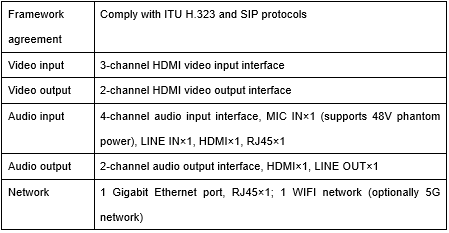
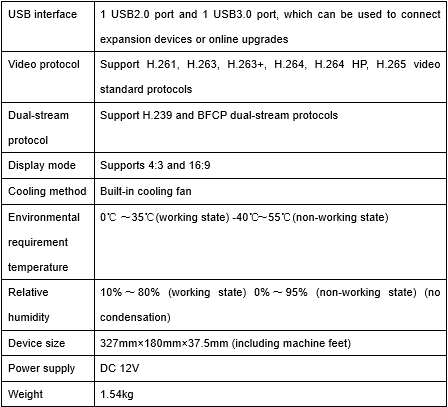
Specifications:
Please leave a message if necessary, we will contact you as soon as possible!